$995 | Hands-on | 25 hours | FlexClass Format
Are you using SharePoint as little more than a browser-based file share? Does it seem like you just replaced network file folders with document libraries? If so, then you’re missing out on a lot of the powerful features that SharePoint Server (2010 and 2013) provides to your organization.
Much of the information you and your coworkers work with every day are documents: Invoices, Purchase Orders, Quotes, Requests for Proposals (RFP), Contracts, Statements of Work, Policies, Procedures, Project Plans, etc… When you create systems for managing documents in SharePoint—instead of just storing documents in SharePoint—you leverage the power to:
- Simplify document creation, organization, and discovery for end users
- Control and improve document distribution
- Improve regulatory compliance
- Decrease costs and increase efficiency
- Take SharePoint to the next level in your organization!
This course begins with exploring an existing document management system built in SharePoint Server and identifying its major shortcomings. Then you will design a well thought out Content Model for some common types of business documents. You’ll use that model to first build de-centralized document management systems that use single location sites, libraries, metadata, and document sets. You’ll then build centralized document management systems that utilize automatic routing, workflows and customized search pages. Finally, you’ll integrate Records Management for full regulatory compliance with your governing authorities’ requirements.
This four-day course is designed to provide the hands-on experience you need to take advantage of the SharePoint Enterprise Content Management (ECM) features to begin developing systems for managing documents in your organization. After taking this class, you can be assured that you will be prepared to work with documents in SharePoint in the most effective way possible.
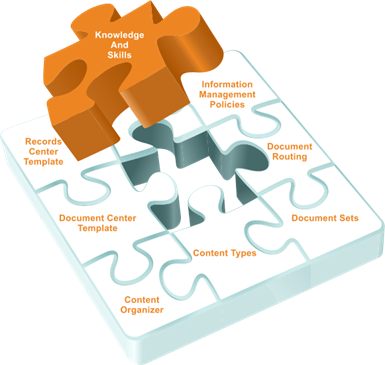 Module 1: Defining Requirements for a SharePoint Document Management System
Every component of a document management system is designed to meet particular business needs. And every ”system” has its own methods and peculiarities that are unique to it. In this module, you will learn the common business needs that systems for managing documents in SharePoint can meet. You will also learn about the experience end users will have when they are creating content and working within the system on a daily basis.
In the lab, you will explore how end users work with documents in a SharePoint based document management system that has already been set up.
Module 2: Developing a “Content Model”
Before you begin setting up anything in SharePoint, it’s important to spend some time gathering the business requirements and planning what you will be building. We call this the ”Content Model” and it will serve as a method of discovering where you are now with your documents, where you need to go, and the best path to get there. You’ll discover or define document templates, metadata required for particular types of documents, workflow processes, roles and permissions of authors and other users, if the document is an official record for regulatory compliance purposes, and understand the document lifecycle.
In the lab, you will work through the process of developing a content model for several types of common business content in the context of a fictional company.
Module 3: Preparing Sites and Libraries
The core foundational building blocks in SharePoint are always Sites, Lists, and Libraries. Although it’s possible to build very simple document management systems using nothing more than sites, lists, and libraries, that doesn’t leverage the real power of SharePoint Server. In this module, you’ll learn to create and configure Sites, Lists, and Libraries as a starting point for more powerful document management systems instead of an end product that is just a simple replacement for network file shares.
In the lab, you will create and configure the initial sites and libraries that will be used in the systems you will be building in the rest of the class.
Module 4: Administering Managed Metadata
Managed Metadata provides a way to create sets of metadata terms that can be centrally managed and used across the organization. Terms are easy to select, even if there are thousands of them. They can contain synonyms, and users can suggest additions to terms sets or they can be used for social tagging of information. In this module, you’ll learn to create and manage the Managed Metadata Term Sets that you will use in the document management systems you’ll be building.
In the lab, you will create, configure, and populate terms sets in the Managed Metadata Term Store, and utilize those term sets in the content types you created in the previous lab.
Module 5: Defining Site Columns and Content Types
Site Columns and Content Types are two of the most powerful, yet under-utilized features in SharePoint. Site Columns allow you to define, manage, and control the metadata that is used throughout your business. Content Types allow you to define, manage, and control the types of content that will be utilized in your document management systems to achieve better scalability, reuse, control, and automation. In this module, you’ll learn how Site Columns and Content Types work and how to define and create them.
In the lab, you will create the initial site columns and content types that will be used in the document management systems.
Module 6: Working with Document Sets
Document Sets is a powerful way to treat multiple documents as though they were a single document. This can be very helpful whenever a particular business process centers on multiple documents such as a loan document packet, request for proposal (RFP), or other project. In this module, you will learn how to create, configure, and use your own Document Set content types to be used within your document management system.
In the lab, you will create a custom Document Set Content Type, configure it, and add it to a library to be utilized in your document-management process.
Module 7: Working with Views and Web Parts
Views are predefined “reports” that allow users to view the items in a list or library in certain ways. The data or metadata associated with each item can be the basis for sorting, filtering, or grouping the items. This helps users find what they are looking for quickly, but can also help surface aggregated information in useful ways. In addition, web parts are modular components of SharePoint that can be used to display lists or libraries in different ways in different parts of the web site. Knowing all of the many options available when creating views can help you make the most of the documents and document metadata in your sites.
In this lab, you will create a number of custom views for a variety of lists and libraries, experimenting with different display options. You’ll also configure web parts to display some of these lists and libraries on the site home page.
Module 8: Custom Workflow Basics
Workflows provide a powerful way of either managing a business process, automating a business process, or both. There are a few out-of-the-box workflows in SharePoint Server that meet very common business needs such as getting approval and collecting feedback. However, much more powerful workflows can be written using SharePoint Designer. In this module, you’ll learn the basics of writing your own workflows using SharePoint Designer to manage and automate processes in your document systems.
In the lab, you will use SharePoint Designer to write and customize simple workflows that meet common needs in systems for managing documents.
Module 9: Creating and Using Site Templates
SharePoint contains a number of site templates for commonly-needed functions. For example, the Team Site template contains a document library, a calendar, a task list, and so on. The fictional company in our case study has a need for a number of sites that are standardized to contain exactly the same list, libraries, and settings beyond what’s already provided in the Team Site template. Rather than starting from scratch for each new site, custom site templates can be created to contain all of the needed elements, and new sites can be created easily with all of the desired features in place.
In this lab you’ll create a new custom site template based on the site created in the previous labs. You’ll then use that template to create new sites, and make minor changes to those sites to make them ready for use.
Module 10: Using the Content Query Web Part
In some cases there is a need to roll up data from a variety of sites within a site collection. The usual list and library web parts are limited in scope to a single subsite. The Content Query Web Part can overcome these boundaries to display or even aggregate information from multiple sources within a site collection.
In this lab you will add and configure a Content Query Web Part to display all documents based on a certain Content Type from throughout the site collection.
Module 11: Document Repository Road Map
At some point an organization must think about long-term storage requirements for documents in their SharePoint production system. This was part of the planning process done at the beginning of class. Now that the elements of the active production intranet site are in place, the archive for inactive documents can be set up and various mechanisms put in place to properly store those documents. This module will review the steps undertaken so far to optimize the SharePoint intranet for these archival processes, and will outline the remaining steps to create it and put it in action.
Module 12: Creating a Centralized Document Repository and Archive
It is typical for the documents in organizations to be spread out in many different libraries in many different sites. Although this makes it easy for the people closest to the information to create their own systems for creating and managing the information, it can make it difficult to find critical information later. A Centralized Document Repository can bring the most important documents together in a single location for managing, storing, discovery and archiving. In this module, you’ll learn how the sites created from the Document Center site template can serve as a powerful centralized document repository for your organization’s most important documents.
In the lab, you will create and configure a site from the Document Center site template, and configure it to serve as a Centralized Document Repository and Archive for all important documents.
Module 13: Configuring “Send To” Locations
Another method of getting content into a centralized repository is to set up ”Send To” locations in Central Administration. This adds an option on the context menu (or edit menu) for a user to quickly move the document to the appropriate location, or send a copy of the document to the appropriate location, or move the document but create a link in the existing library to the new location. In this module, you’ll learn how to set up custom ”Send To” locations to accomplish this.
In the lab, you will access the Central Administration web site to set up Send-To locations and then you will test the functionality by using it to manually route documents to the central document repository.
Module 14: Publishing Content Types
The Content Types created in previous modules are needed not only in the intranet SharePoint site collection, but in the Document Center and Records Center site collections as well. The Content Types will be the basis for rules used by these site collections to evaluate and “file” incoming documents. Content Types that reside in a site collection that has been designated as a Content Type Hub can push the Content Types to other site collections that subscribe to this publishing service. In that way, Content Types can be created just once, and can be maintained in a central location and simply be republished when revised.
In this lab you will configure the SharePoint intranet site collection to be a Content Type Hub, and will publish the custom Content Types created in previous modules so that they are available to the Document Center and Records Center site collections.
Module 15: Setting Up the Content Organizer
One of the biggest challenges in any document management system is getting users to upload content to the right location. The Content Organizer feature of SharePoint provides a way for you to use a centralized ”drop off” location for users to upload all content and tag it. Then, rules will look at the metadata tags the user provides and automatically route the document to the correct location for storage. In this module, you’ll learn to set up the Content Organizer and write rules for automatic routing of documents to appropriate storage locations.
In the lab, you will configure Drop-Off Libraries to provide convenient locations for adding documents into the system. Then you will configure Rules in the Content Organizer to properly route content to the Document Repository as needed.
Module 16: Automating Document Archiving with Workflows and Information Management Policies
The steps undertaken previously allow for manual archiving of documents. However, in most cases it is desirable that archiving occur in an automated fashion, based on a variety of criteria. This automation can be accomplished through two different tools in SharePoint – Information Management Policies and custom workflows created in SharePoint Designer. Information Management Policy works very well with time-based criteria; for example, when policy states that a certain type of document should be archived one year after it was created. Workflows can be used with the criteria is not time-based, or when other factors might come into play.
This lab will take you through the steps of using Information Management Policy to archive documents and to automatically delete documents when their retention period has ended. You will also create a custom workflow to archive files when a Status metadata field indicates that a process is complete.
Module 17: Records Management Primer
To many business professionals, Records Management is a field with which they have limited background and understanding. With the 2006 Amendments to the Federal Rules for Civil Procedures, the U.S. court system established that all electronic records are subject to eDiscovery during a lawsuit. This has resulted in much more widespread interest in having capable records management functionality in electronic document management systems like SharePoint.
In this module, you will receive a “primer” on records management terminology, regulations and best practices. The subject will be approached from a layman’s perspective so all students in the class can walk away with a practical understanding.
Module 18: Using SharePoint to Declare and Manage Official Records
With the centralized Official Records site built out, you will configure Information Management Policies on Content Types and Libraries and Folders. Information Management Policies are used to specify retention stages for a content type, library or folder. Information Management Policies can also be used to enable audit trails for content types, libraries, and folders.
With Information Management Policies in place, you will test the declaration of records and the routing of records from libraries where they have been authored to the centralized Official Records site. You will also learn about the in-place records management functionality of SharePoint which is useful in situations where a centralized records site is not practical or desirable.
Module 19: Performing eDiscovery and Managing Legal Holds with SharePoint
The payoff to establishing and maintaining a sound records management system is being able to efficiently and accurately respond to eDiscovery requests during a lawsuit. SharePoint offers tools to assist with finding all of the records related to one or more subjects of a lawsuit and then establishing Legal Holds on the records to suspend the retention policies until the lawsuit is complete. In this last module of the course, you will learn how to properly configure and use these capabilities.
This course is intended for students who will be working on a project to design\architect a SharePoint Enterprise Content Management solution. It is considered an intermediate to advanced level SharePoint course and prospective students should have significant experience with SharePoint before taking this course.
Special Note: When registering for this course, students will have the option to request to take the course using a SharePoint 2010 lab machine OR a SharePoint 2013 lab machine. The vast majority of the Enterprise Content Management and Records Management functionality is the same in both SharePoint 2010 and SharePoint 2013, so regardless of the lab environment selected students will be able to complete the full course.
Each student will be provided with the following:
- A custom-developed, comprehensive electronic course manual containing:
- Presentation slides with speaker notes, and
- Step-by-step, scripted hands-on lab exercises
- Remote Desktop access to your own SharePoint site on a virtual server for one full week
(Click here to verify that your computer meets the minimum requirements to connect to the lab environment.)