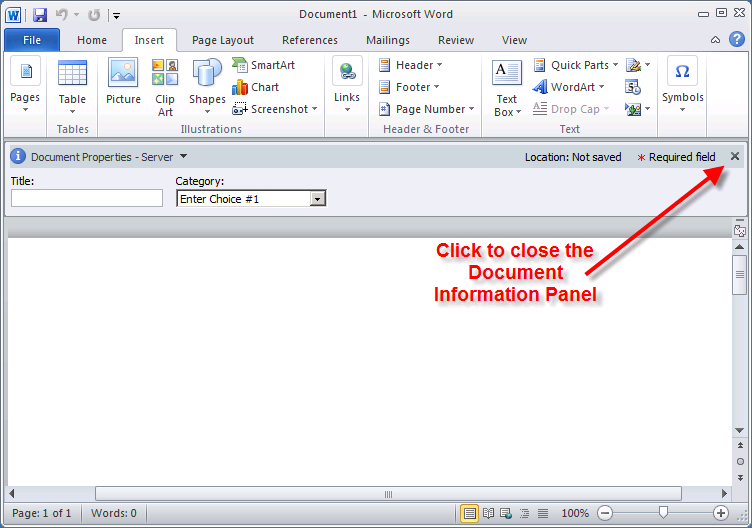
One of the most convenient ways to enter, edit, or view the SharePoint metadata for a Microsoft Word document (or other Microsoft Office document) is to use the Document Information Panel (DIP). For Office documents that are not stored in SharePoint, the panel can be used to view and edit the Document Properties fields that are built in to Office documents. When opening a document uploaded to a SharePoint Library, the DIP often opens automatically. It’s very easy for a user to accidentally (or sometimes on purpose) hide the DIP: This is done by simply clicking on the “X”, as shown below. Once it’s closed, however, the user may not know how to open the Document Information Panel again. Here’s how.
Open the Document Information Panel Through the Backstage
Unfortunately, once the DIP has been closed, it’s not so obvious how to show the it again. However, it’s not difficult to open the DIP, either. Click the File tab to go to the Backstage area. In the left navigation panel, click the Info category. On the right side of the screen, click the Properties drop-down and choose Show Document Panel.
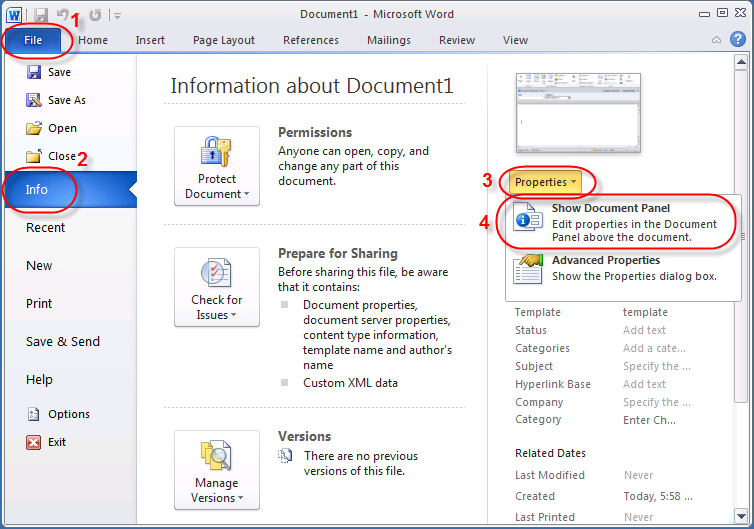
There you have it, four simple clicks to open the Document Information Panel in Word (or Excel or PowerPoint).
To learn more about working with metadata in Microsoft Office documents in SharePoint Libraries, plus lots of other document management tools, techniques, and strategies, take a look at our class Designing SharePoint Document Management and Records Management Systems in SharePoint 2010. In the course we dig deep into the interaction between SharePoint Library metadata and Word. We develop Word templates associated with Content Types; these templates include fields for the Library metadata inside the document body as well as being visible and editable through the Document Information Panel. We offer additional SharePoint training as well.